

TMS links for clients, carriers and drivers
A link lets someone outside your company open a page of yours without signing in: a carrier confirms an order, a client follows a delivery or downloads its invoices, a driver sees his next stops on the phone. Each link shows only what its page is for, and nothing else of your organization.
The four links
| Link | For | Covers | Works by default |
|---|---|---|---|
| Link for the carrier | The carrier of one order | That order | 60 days after the last unloading; the carrier's own activity keeps it open |
| Tracking link for the client | The client of one order | That order | 14 days after the last unloading |
| Link for the client | One client | Its orders and its invoices | 180 days |
| Link for the driver | One of your drivers | His orders of the next days | 365 days |
When you make a link you can set Valid for (days), from 1 to 365; left empty, the default above applies. You also choose the language of the page: Polish, English or German.
Making and stopping a link
The address is shown once
"For safety the address is shown only once, when the link is made. If it is lost, make a new link." Copy it before you close the window.
- Order links live on the order card's Sharing tab: Create carrier link or Create tracking link, with For whom (optional) for your own records. Links of this order lists each link with its state (Active, Revoked, Expired), until when it is valid, when it was last opened and how many times. Revoke stops a link at once: "Whoever has it will see that the link is not valid."
- The client's and the driver's link: a client and a driver have one live link each. Make a new link replaces the current one, and the old address stops working at once. Revoke the link stops it without a new one. The line under the title says whether the link is Active, until when, and when it was last opened.
- An expired, revoked or unknown address shows the same page to whoever opens it, so it gives nothing away.
- A link that Quanty support made while helping your organization stops working when that support access ends. Links your own people make keep working after they leave the company.
The carrier's link
The carrier's page shows one order: what to carry, where and when, and the agreed price. On it the carrier can:
- Confirm the order with the truck plate, the trailer plate, the driver and his phone, and, optionally, the day it will send the documents by (before that day nobody reminds it). Plates it gave before are offered again ("Vehicles you gave before"). Until delivery it can Change the truck or the driver, and the forwarder sees the change at once.
- I cannot take this order, with a short reason, before it confirms. The order's owner gets the issue The carrier declined the order, and the order card shows the reason.
- Enter the Actual times of arrival and departure at a stop, where nobody else has set them (your telematics, a dispatcher or an import).
- Upload documents: CMR, proof of delivery, pallet receipt, thermograph printout and others, up to 25 MB each and 20 per link. They count as the carrier's documents on the order.
- Send its Invoice for the order: the file, its number, the net and gross amounts and the currency. It arrives as a carrier cost draft matched to the order, never as a second copy of a cost you already hold. After that it can only Send a correction.
- Write in a conversation about its invoice, with files up to 10 MB (at most 20). Your team answers on the cost card, see TMS carrier costs and payments.
Send the order to the carrier e-mails this link with the order PDF, and sending the order again carries the same link (see TMS operations). A link you make on the Sharing tab is a separate one.
How long it works
A new carrier link works until 60 days after the last unloading, because carriers often invoice weeks after the delivery. Each document, invoice or message the carrier sends through a live link keeps it open at least 30 more days. On the Sharing tab, Extend by 30 days adds 30 days to a live or expired carrier link: "The link now works until …". It never goes beyond a year after the last unloading, a revoked link is never extended (make a new one), and a link of a carrier that no longer runs the order cannot be extended either.
The tracking link for the client
The client sees the status, the stops with plan and progress, the expected arrival and an approximate position, without prices, the carrier or the driver's data. With the automatic action E-mails to clients on, clients also get a tracking link by e-mail when the order is loaded or delivered (see TMS overview).
The client's link
On a client's card, the ⋯ menu has Link for the client: "… sees its orders with their status and documents, and its invoices. No freight prices and no carrier." Choose the page language, and either copy the link or switch on Send by e-mail (To and Cc (optional), the e-mail in the page language) and press Make and send. Nothing is e-mailed until a person does that.
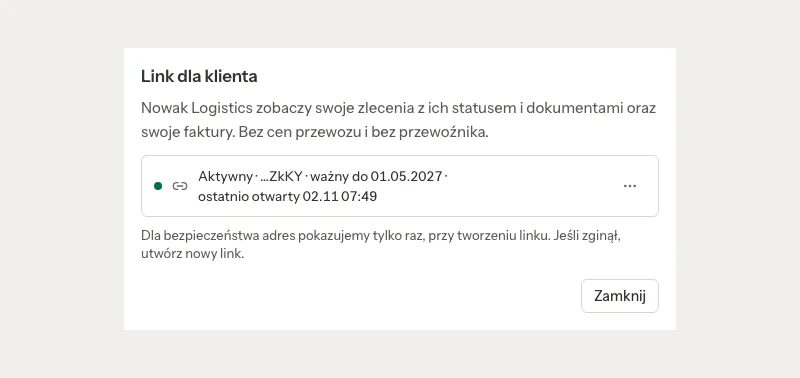
The client's page has two parts:
- Orders: its orders of the last 90 days and the coming ones, 25 a page, newest first: your number, its own reference, the route, the planned loading and unloading, a plain status, the expected arrival while on the way, and Show the order with the stops (planned, arrived, left) and the documents it may download.
- Invoices: invoices issued to it in Quanty, from the last 365 days or still not fully paid, with the amounts, what is paid and left to pay, the state (To pay, Overdue, Partly paid, Paid), the KSeF number and Download PDF.
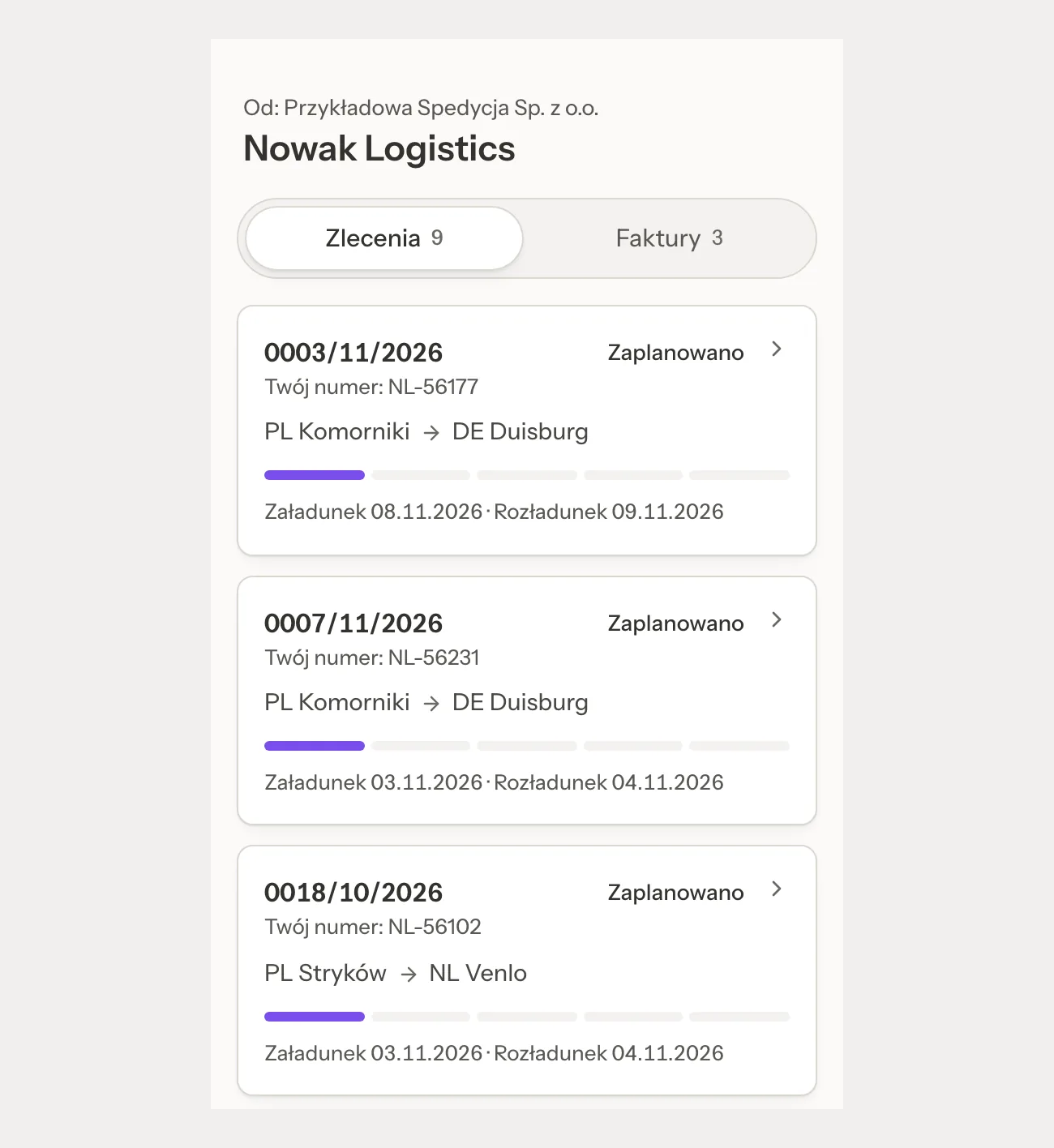
The page never shows prices or the freight, the carrier, the driver, plates, internal notes, issues, GPS positions, the carrier's invoice or your order to the carrier. Of the order's documents, the client sees the CMR and the proof of delivery by default. Any other document only after Visible to the client in its menu on the order card ("The client sees it"), and a hidden or rejected document never. Visible to the client takes only a file you may open in Files: a confidential file is refused ("This file is confidential in Files, so the client never sees it."), and so is a file only some people of your company see ("Only some people of your company see this file in Files. Share it with the whole company first, then show it to the client."). The client's page never shows a document whose file is confidential, deleted, or not visible to the whole company, unless the carrier or a driver sent it through their link; a file made private later disappears from the page too.
An archived client cannot get a new link, and its existing link stops opening; it opens again if the client is restored before the link expires. For a client that comes from Marcos TMS while that connection runs, or for sample data, Quanty does not e-mail the link: make it without the e-mail and send it yourself.
When an admin anonymises one of the client's contact persons, the dialog says: "The link for the client keeps working: it belongs to the company, not to this person. If this person got it, revoke it under 'Link for the client' on the client's card."
The driver's link
On a driver's card, the ⋯ menu has Link for the driver: "… sees on the phone the orders from yesterday to three days ahead, reports arrival and departure, and adds document photos and expenses." "Quanty does not send this link by SMS or WhatsApp. Copy it, or let the driver scan the QR code from your screen." Only an active driver gets a link.
His page opens with "Orders from" and your company's name, then "Hello" and his first name. On it the driver sees the orders where he is the driver or the second driver, with a stop from yesterday to three days ahead or on the road now: the truck, the trailer, the temperature, ADR goods, the equipment, and the stops in order with the address, the time window, the reference, the booking, the ramp and the contact (Call). Never a price, the client's money, the carrier, another driver or a note of the office. He can:
- press I am here and I am leaving at each stop, unless the office or the truck tracking already entered that time;
- Add a document photo (CMR, POD, pallet receipt, thermograph printout or other); it lands on the order marked From the driver;
- Add an expense (fuel, AdBlue, road toll, parking, wash, repair, parts, accommodation, fine or other) with a receipt photo: "The office checks every expense before it counts."
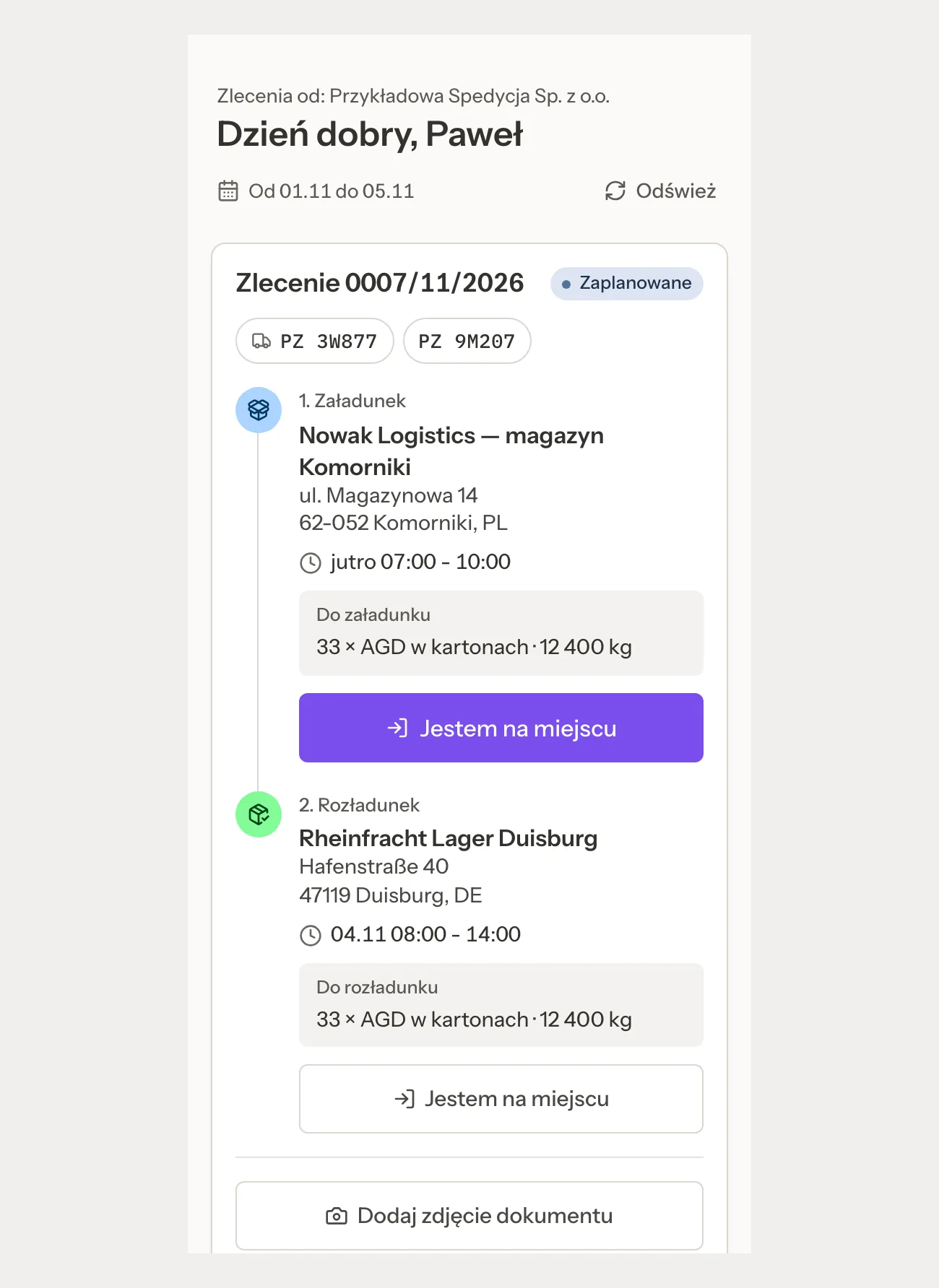
A driver who is no longer active, or whose data is anonymised, loses the link at once; the Anonymise dialog says so: "The link for the driver stops working at once: whoever opens it sees that it has expired."
Who can make them
- The links of an order (carrier, tracking), Extend by 30 days, Visible to the client and the client's link belong to the Dispatch module; the driver's link to Fleet (see TMS modules). Viewers make none.
- The assistant in chat can tell you whether a link is live, until when and how often it was opened, but making, e-mailing, extending or revoking a client's or a driver's link is always done by a person in the app.
Related pages
- TMS operations: sending the order to the carrier and the driver.
- TMS clients and carriers: the client's card.
- TMS people, trips and working time: the driver's card.