

TMS clients and carriers
Clients and carriers live in one register of contractors: a company can be a client, a carrier or both. Sales, Clients and Operations, Carriers open the same register on its Clients or Carriers tab.
The register
The tabs are All, Clients, Carriers, Blocked and Over the limit. Search by name, NIP or city, and filter by verification, group or tag. Quick filters show Limit renewal (30 days), No orders for 12 months and Show archived.
The columns include the NIP, the city, the role, the Last order date, the credit-limit renewal, the verification and how much of the credit limit is used. Add contractor creates one, Import from file brings a whole list in from CSV or Excel, and Export CSV downloads up to 2 000 rows.
The contractor card
The card's tabs are Data, Contacts, Limit and verification, Orders, Money and Places. The ⋯ menu holds Tidy up from notes, Archive or Restore, and, for admins, deleting the contractor.
Data
- Identity: name and short name, NIP or EU VAT number, address, GLN, EORI, KRS, the forwarder's liability insurance (OCPZ) with its sum and expiry, website, a second phone and a fax.
- Check in VIES checks an EU VAT number with the EU's VIES service: active, not active, or "VIES did not answer" (nothing is changed then). When you add a contractor with a VAT number from another EU country, VIES fills in its name and address, and you check them before saving. A name that differs from VIES is pointed out.
- Account managers: who looks after this contractor, role by role (sales, forwarding, operations, customer service and its deputy, the person who takes the orders). When someone leaves the organization, their roles move to their successor.
- Bank accounts: accounts we pay to (carriers, suppliers) and accounts they pay us from. Each account has its own VAT white list check, and payment batches pay to the default account.
- Invoicing: how this client is invoiced (below).
- Change history of the card.
Invoicing terms
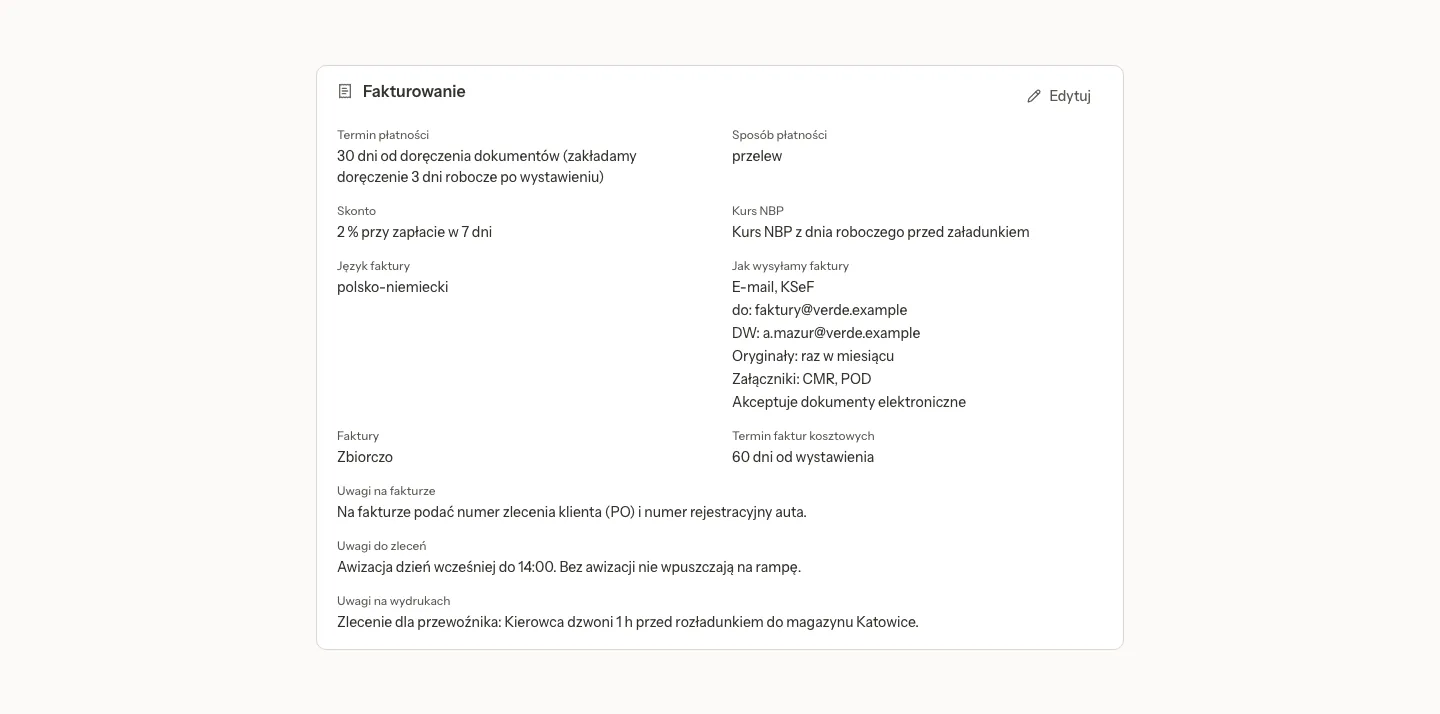
The Invoicing section reads as sentences, and Edit changes them:
- Payment term: days from the issue date or from the delivery of documents (with days for the delivery, working days on the Polish calendar), the end of the month, a fixed date, or "in blanco" (no due date). Lock the term lets only an admin change the term, the payment method and the skonto, here and on this client's invoices.
- Payment method and Skonto: up to 5 tiers, such as 2 % when paid within 7 days.
- NBP exchange rate: the working day before the loading, the unloading or the invoice date, or as in the company settings.
- Invoice language: Polish, English, German, Polish-English or Polish-German.
- How we send invoices: e-mail (to and cc), KSeF, post or the client's portal, how originals are sent and which attachments go with them.
- Remarks: on the invoice, for orders, and on printouts (for example on the order for the carrier).
- Invoices one by one or collective, and the term for cost invoices.
Tidy up from notes asks the AI to propose these terms from the free-text notes on the card. It follows the organization's AI switch and spending limit, and it saves nothing: you look at the proposal and save it yourself.
Contacts
Contact persons with their e-mail, phone and language. An archived contact gets no status e-mails or reminders and is not put on new orders or quotes; what already names them keeps working.
Limit and verification
- Verification: the result of checking the contractor (payment history, registers, insurance): Positive, Neutral, Negative or Not checked.
- Credit limit: what the client owes right now, in PLN: orders not invoiced yet plus unpaid invoices, with what is overdue. What makes up the amount lists them.
- Rules: a template or an own limit, what happens past the limit (Only warn or Stop new orders) and the tolerated delay in days. Rules are changed by an admin.
- Permissions to go over: an admin lets the client's orders through until a chosen day (never open-ended) and up to an amount over the limit, with a reason. A permission ends by itself, and while it lasts it shows in Issues.
- Blocks: Block as client and Block as carrier. A new order with a contractor blocked on that side (as its client or as its carrier) cannot be confirmed. Unblock once lets one order through without lifting the block.
The credit line counts once, on the payer of an order if it has one, else on the client. A confirmed order is checked again whenever what it uses of the limit grows or moves to another party, for example a new payer or a correction that raises the freight. Orders marked No invoice use no limit.
What a block does on the order
A blocked client's order can still be saved as a draft. Confirming it needs a one-off unblock from an admin on the contractor's card, and the order says so in plain words, naming the payer when it is the payer that is blocked.
Orders and Money
Orders lists the contractor's orders. Money shows the balance: invoices, payments and what is still open. For carriers, Rate the carrier gives each order the carrier actually carried 1 to 5 stars and a comment. A carrier's card can also ask for the rating within a set number of days after unloading, and a missing rating then shows in Issues.
Places
Places lists the contractor's addresses: Branches and Loading and unloading places, each with its kind. A branch can be the Invoice address: invoices for that branch go there. Addresses typed on confirmed orders are collected onto the client by themselves, without duplicates.
Orders have a client branch, and an invoice keeps its correspondence address frozen at issue: a new invoice never goes to a closed branch, and a correction goes where its invoice went.
Archiving
Archive takes a contractor out of the register's lists (Show archived still shows it) and out of the pickers for new orders, quotes and invoices, with an optional reason. Orders and invoices that already name it keep showing it, and its active orders carry on. Recurring order templates that use it pause until it is restored, and the dialog says how many. Restore brings it back at any time.
Related pages
- TMS orders and quotes: where the credit line, the blocks and the remarks show.
- TMS invoices, costs and payments: payment terms on invoices, reminders and payment batches.