

TMS fleet and workshop
The Fleet section of the TMS rail holds your own vehicles and what keeps them on the road: Vehicles and sets, People (see TMS people, trips and working time), Map (see Fleet map) and Workshop.
Vehicles and sets
Vehicles and sets shows "Vehicles, trailers and the sets on the road" on the tabs Tractor units, Trailers, Cars and vans and All, in three views:
- List: plate, type, make and model, VIN, the set, the position, the status and the next deadline.
- Sets: which tractor runs with which trailer and driver right now.
- Deadlines: one calendar of insurances, inspections and tachograph calibrations, filtered by what ends in 30 days, in 7 days or has already passed.
Add vehicle, Link with telematics, Import from telematics and Open the fleet map are in the page's actions. See Telematics (GPS) for connecting a provider.
Switching a set
A set is a tractor with its trailer, driver and second driver from a given moment. Switch (on the vehicle card or in the Sets view) starts a new set at the moment you choose, and the old one ends at the same moment. Every switch is kept in the set history and can be undone with a reason; nothing is deleted.
Quanty also proposes switches. When an order, the driver card in the tachograph (through telematics) or your existing TMS says a tractor runs with another trailer or driver than the fleet register, a proposal waits under Sets to check, before and after in plates and names. Switch applies one, Switch all from orders applies every proposal that comes from orders, and Only this order keeps the set and marks the order as the exception.
The vehicle card
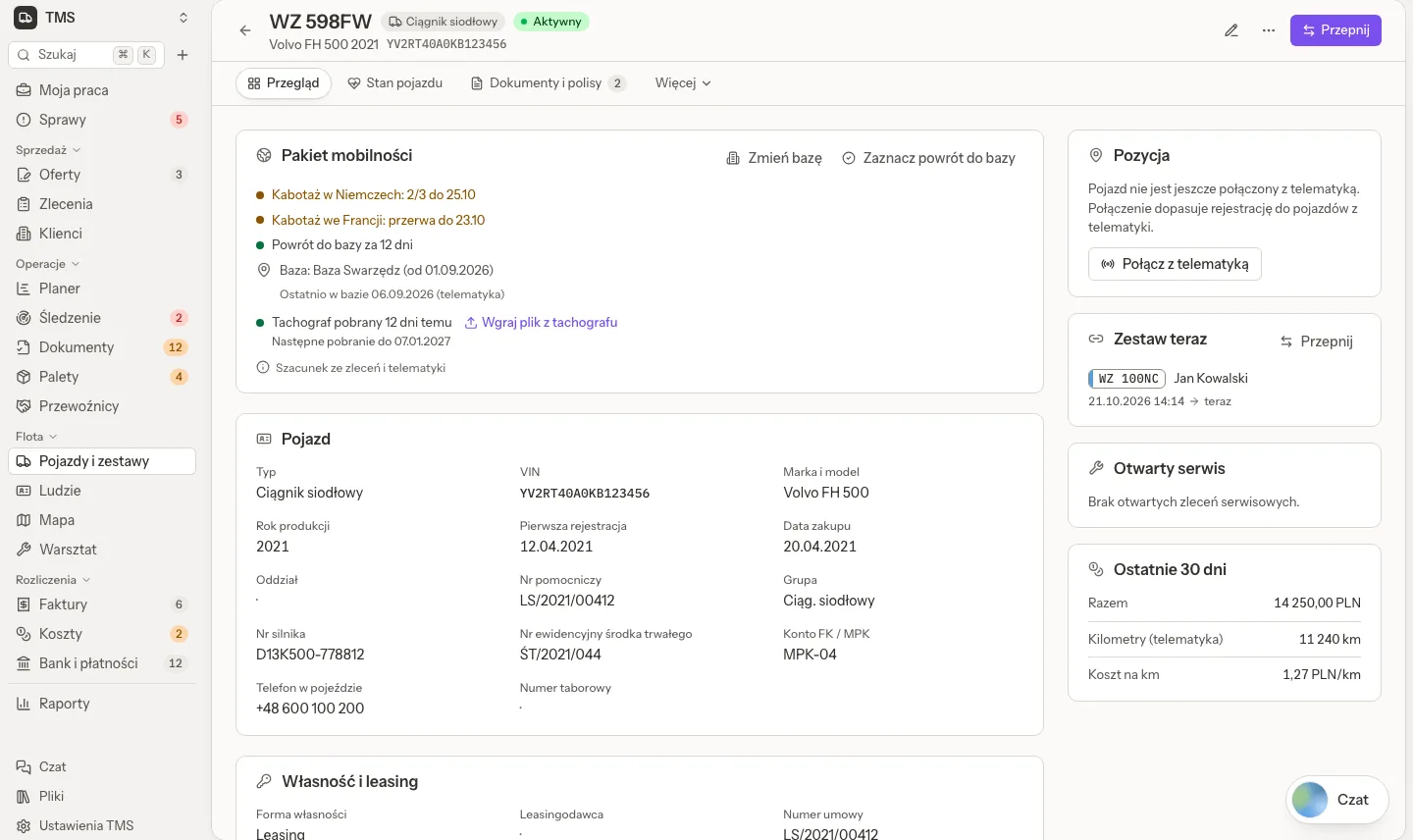
The card's tabs are Overview, Health, Documents and policies, Service and costs and History.
- Overview: the vehicle's data (type, VIN, make and model, year, registration, branch, cost centre, fixed asset number, ownership and leasing), its position, Set now with Switch, the open service and the last 30 days: costs, kilometres from telematics and the cost per kilometre. For international transport it also shows the mobility package: cabotage, the return to base and the tachograph download (see TMS people, trips and working time).
- Health: a score and what needs attention, the tyre on every wheel, and the findings from telematics and the workshop.
- Documents and policies: drop a scan and Read the dates fills the dates from the document (with the AI switch on; the fields read from the document are marked, and you check them before saving). Policies (with renew) and deadlines live here, and each deadline shows in the fleet calendar and in Issues before it ends.
- Service and costs: service orders, fleet costs, Damages and accidents and Costs under warranty. The card also has a fuel panel with the vehicle's fuel norms and tank size.
- History: every change in plain words.
Tyres
Workshop, Tyres is the tyre register. Receive tyres takes them by serial number (one tyre per serial) or by count. Each tyre shows where it is, its kilometres, its tread and its cost per kilometre, and the tyre card shows its whole history: mount, take off, move to another wheel, tread check, retreading, complaint and scrap.
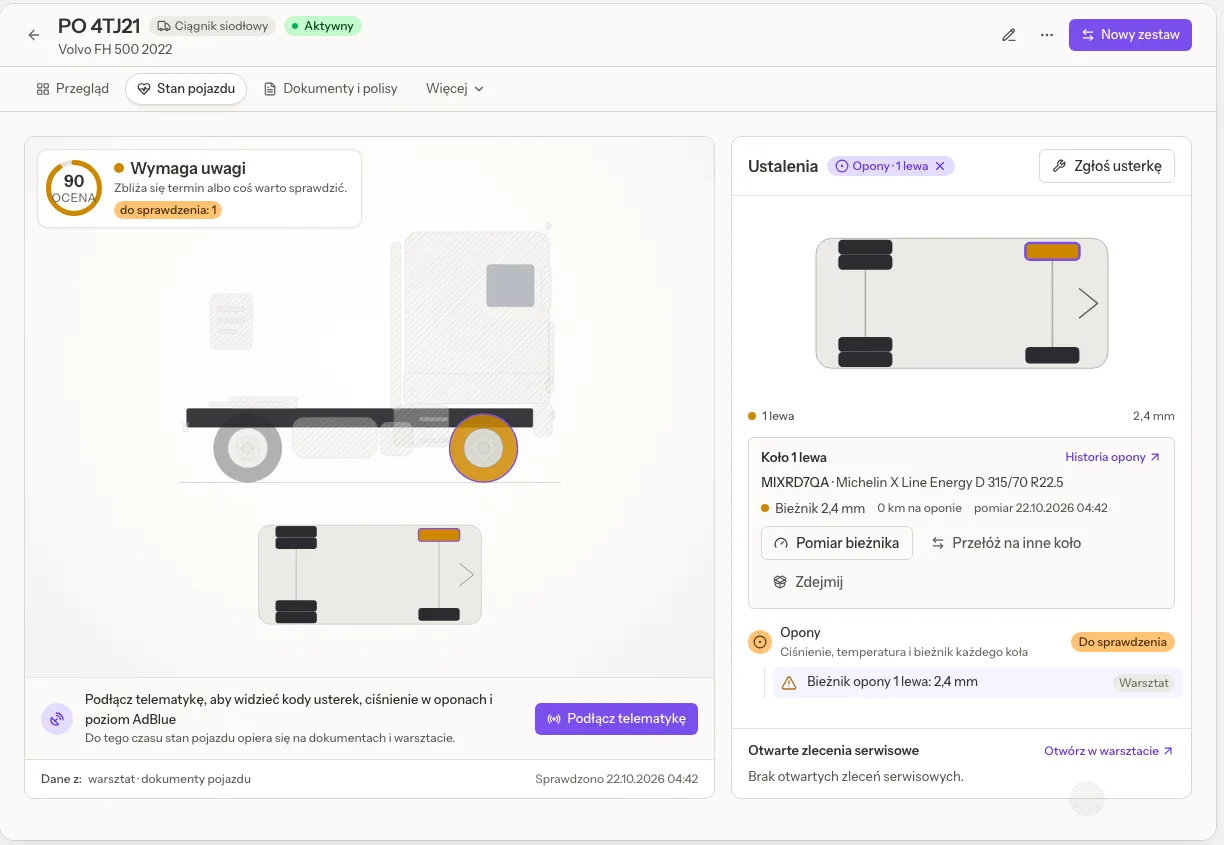
On the vehicle card, Health, click a wheel to open its tyre: Mount, Tread check, Move to another wheel or Take off. A tread at or below the company minimum (3 mm by default, editable) shows an alert and an issue, and 1.6 mm is critical. A newer reading always wins over an older one, whatever order they are typed in.
Damages and warranties
Service and costs, Damages and accidents, Report a damage records what happened, when and where, who was at fault, the driver (by default the one on the vehicle's set at that moment), the other party, the policy (its insurer and deductible are copied), the insurer's claim number and the police note. Damages are numbered SZK/0001/2026; cargo claims on orders keep their own REK numbers.
- Order the repair opens a service order for the damage.
- When your driver was at fault, the form says so and keeps the amount on the damage, for your company to take into account in the driver's bonuses and deductions. Quanty deducts nothing.
- Read the statement (optional AI) reads a scan of the accident statement and fills the form. Nothing is saved until you save.
A warranty is kept on a line of a split invoice, on a vehicle cost, or on a repair or tyre service order, until a date or for a number of kilometres. Costs under warranty shows it on the vehicle card, and a later repair inside a warranty raises the note Warranty claim possible. A kilometre warranty is checked only where the odometer is known; otherwise the card says that the odometer is not known.
Fuel
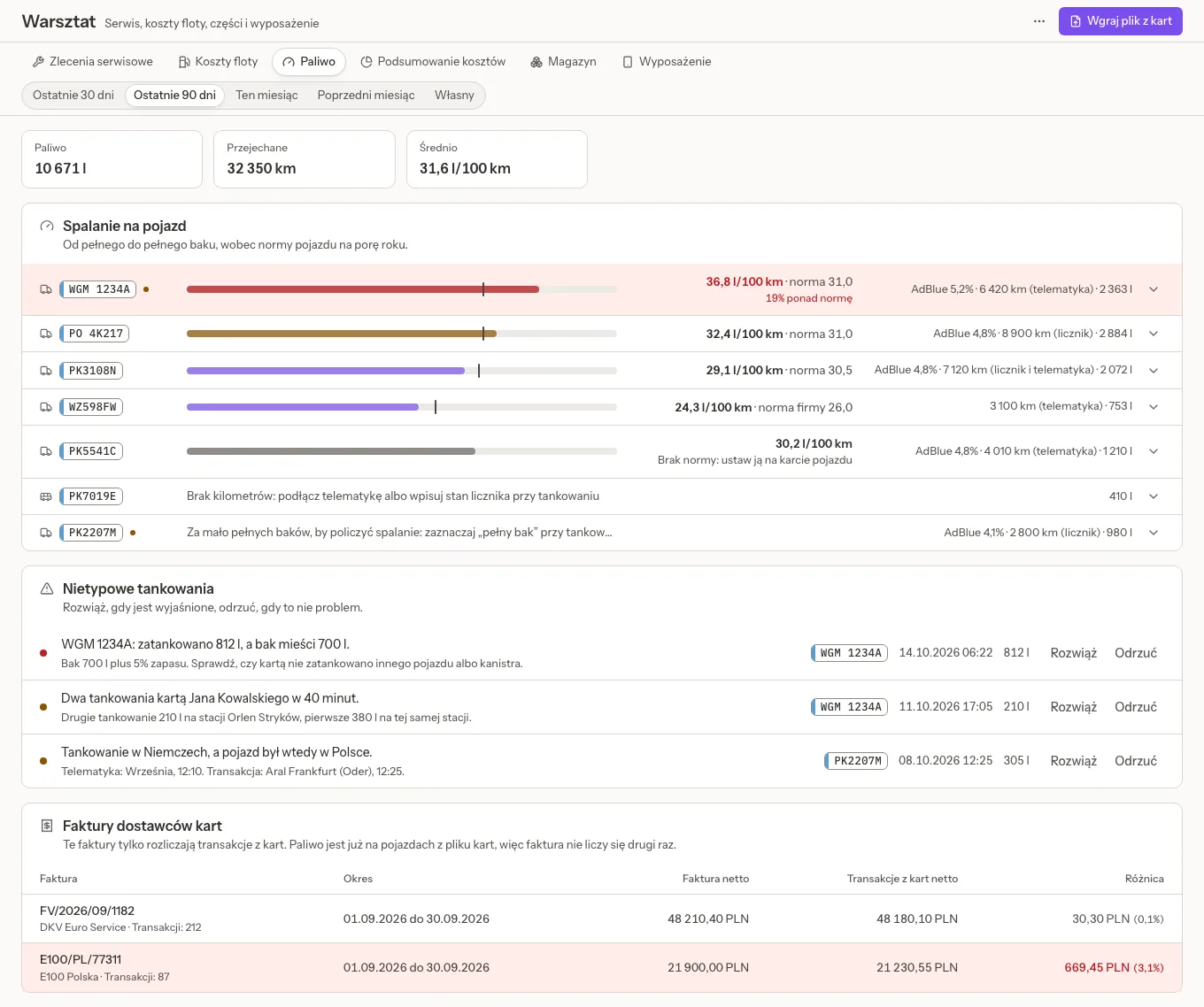
Workshop, Fuel reads the transaction files of your fuel cards.
- Upload card file: presets for DKV, E100, Shell, UTA, IDS, Orlen and Eurowag, or any CSV or XLSX through a column mapping. The file is read without AI first; for a new supplier the AI can suggest the mapping once (with the AI switch on), and a person saves it.
- Preview, then save. Each fill lands on a vehicle through the card's driver and that driver's set at the time, the card's vehicle, or the plate. A refused line says why. A file imported twice adds nothing, and a corrected amount, VAT rate or storno never books a fill twice.
- Consumption per vehicle is counted from full tank to full tank against the vehicle's seasonal norms (or the company's), with the distance from the odometer or telematics and AdBlue as a percentage of diesel. Mark a fuel cost as Full tank where needed.
- Unusual fills become issues: more than the tank holds, two fills on one card close together, a fill in a country where the vehicle was not, a segment above the norm. Control thresholds sets the limits.
- Card supplier invoices settle the card rows of the same month, so fuel is never counted twice, and a difference between the invoice and the card rows is shown.
The Environmental fee report turns litres into tonnes by fuel density and multiplies them by the rates an admin enters under Environmental fee rates. Quanty has no built-in rates: you copy them from the annual notice for the year you settle, and a missing rate is shown as missing, never as zero. The statutory values used (density, the threshold below which there is nothing to pay) are shown with their source and marked to verify: confirm them with your accountant.
Equipment and handover
Workshop, Equipment lists what people hold: phones, cards, tools, with inventory, IMEI, ICCID, phone, SIM and card numbers, invoice number, purchase and disposal dates. Search works by any number, with spaces ignored. Each issue and return has a numbered protocol, signed on screen or with an uploaded scan, and printed.
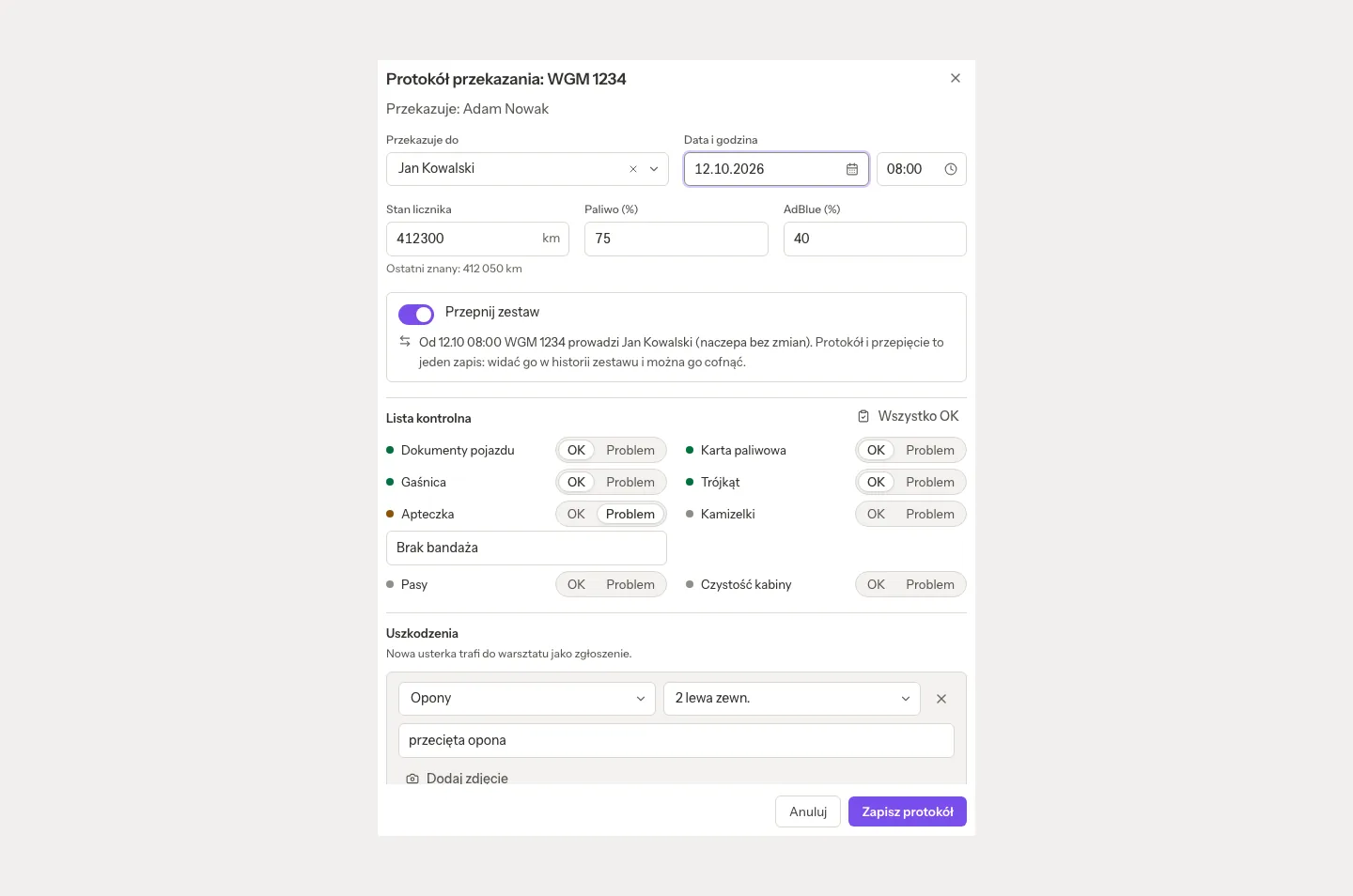
Handover protocol on a vehicle (PZO/0001/2026) records the odometer, fuel and AdBlue, a checklist, damages with photos (a new damage goes to the workshop as a report) and a signature. With Switch the set on, handing the vehicle to another driver switches the set in the same step, and it can be undone. The protocol prints in Polish, English or German and is listed on the vehicle's documents.
Workshop
Workshop is "Service, fleet costs, parts and equipment", on the tabs Service orders, Fleet costs, Fuel, Cost summary, Stock, Tyres and Equipment.
- Service orders run on a board. An order is for your own vehicle, a customer's vehicle or an investment. It takes labour lines (typed hours, or a start and stop timer that never records more than 24 hours) and parts with Issue parts and Return parts. A customer's job makes a draft invoice for its parts and labour. An admin can stop a timer someone forgot, and a job is not settled while a timer runs on it.
- My day shows a mechanic's jobs for the day, with Start, Pause and Finish, and works on a phone.
- Fleet costs and Cost summary: every cost per vehicle and category: fuel, tolls, repairs, leasing and the rest.
Parts store
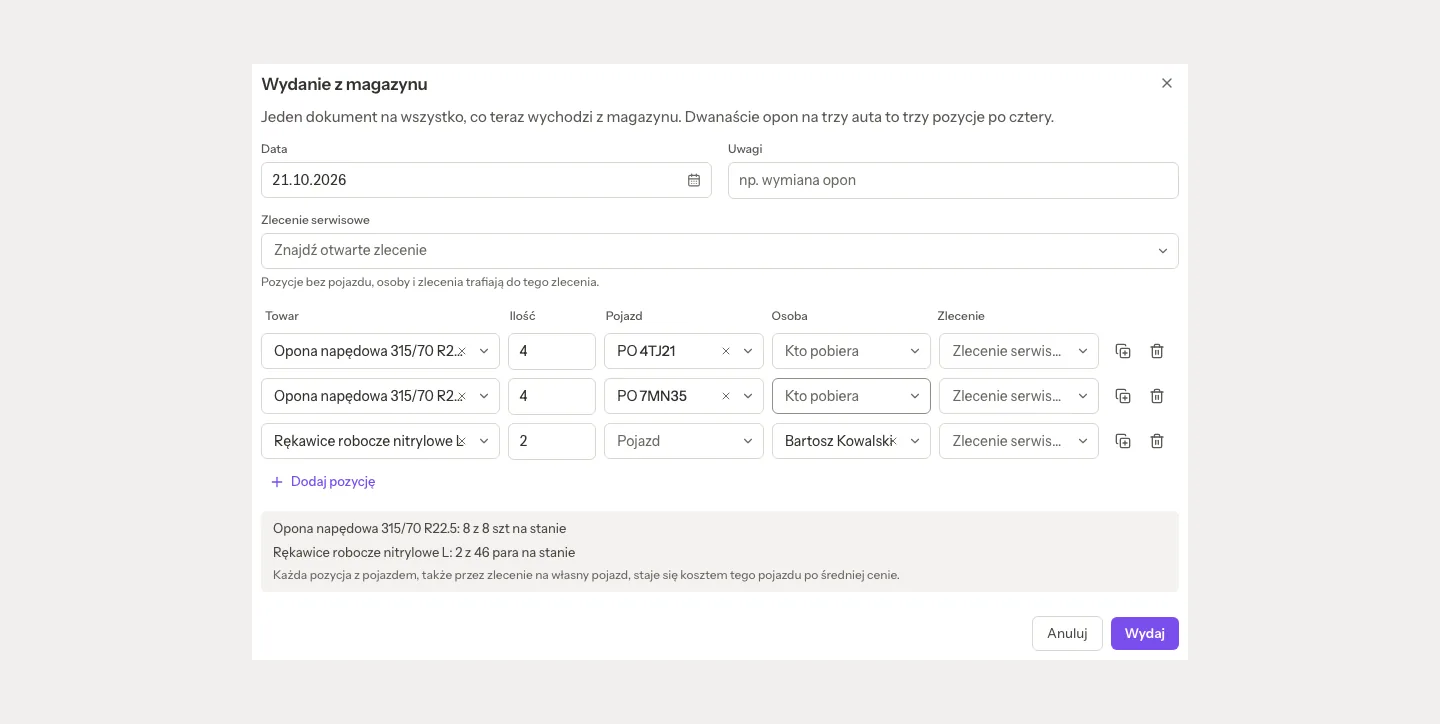
Stock keeps one or several stores with numbered documents: PZ (receipt), RW (issue), ZW (return) and PW/RW for a stocktake.
- Receive: by hand, or from an approved purchase invoice with Receive into stock on the cost card.
- Issue: one document can cover several vehicles, people or workshop jobs, such as twelve tyres for three trailers as 4 + 4 + 4. Each line to a vehicle becomes that vehicle's cost, at the moving average price. Issuing fuel books a fuel cost.
- Return to the store says who brings it back, never returns more than that person, vehicle or job holds, and credits the price that was charged.
- Stocktake, a printed issue protocol (Polish, English or German), and the Materials used report: who took how much and what it cost, net of returns, also as Excel. The driver's card shows what he took under Taken from the store.
Related pages
- TMS invoices, costs and payments: splitting a fleet invoice to vehicles.
- TMS people, trips and working time: drivers, their documents and the mobility package.
- Telematics (GPS) and Fleet map and Map view.