

TMS invoices, costs and payments
The Billing section of the TMS rail has three pages: Invoices (what you invoice your clients), Carrier costs (what carriers and suppliers invoice you) and Bank and payments (receivables, the bank, transfers and the cash desk).
Invoices
Invoices opens on To invoice: delivered orders that are ready to invoice. Tick the orders and Issue invoice, then choose One invoice per order or One collective invoice. The other tabs are Open (issued, not paid yet) and All. New invoice without an order covers everything that is not transport (renting out a hall, selling a vehicle, a re-invoice): an invoice, a pro forma or a debit note, created as a draft.
An invoice starts as a draft and gets its number when it is issued.
- Issue date: an invoice dated another day than today asks first. An invoice cannot have an earlier date than an invoice with a lower number in the same series; only an admin can issue it with an earlier date, and the reason stays in its history.
- Payer: someone other than the buyer can pay the invoice, and the client's credit line then counts on the payer.
- Lines: names, PKWiU, quantities and prices. Under each line the printout shows the transport data frozen at issue: loading and unloading dates, the route, the plates (they can be switched off) and the client's order number.
- Foreign currency: the printout carries the VAT summary and the NBP note, at the rate the client's terms say.
- Factoring prints the factor's account and the assignment clause.
- Correction makes a correcting invoice that names the invoice it corrects and its KSeF number, and, when the company or the buyer changed since, the parties as the corrected invoice printed them.
- Create similar, Mark as sent, Cancel invoice and Add payment are in the invoice's menu.
Payment terms
The due date follows the client's invoicing terms (see TMS clients and carriers): days from the issue date or from the delivery of documents, the end of the month, a fixed date or in blanco. It is computed once, at issue or when the pending documents arrive, and printing, reprinting, marking as sent, e-mailing or editing never move it. An in-blanco invoice is never overdue and never reminded. Skonto tiers print as notes on the invoice.
Printouts
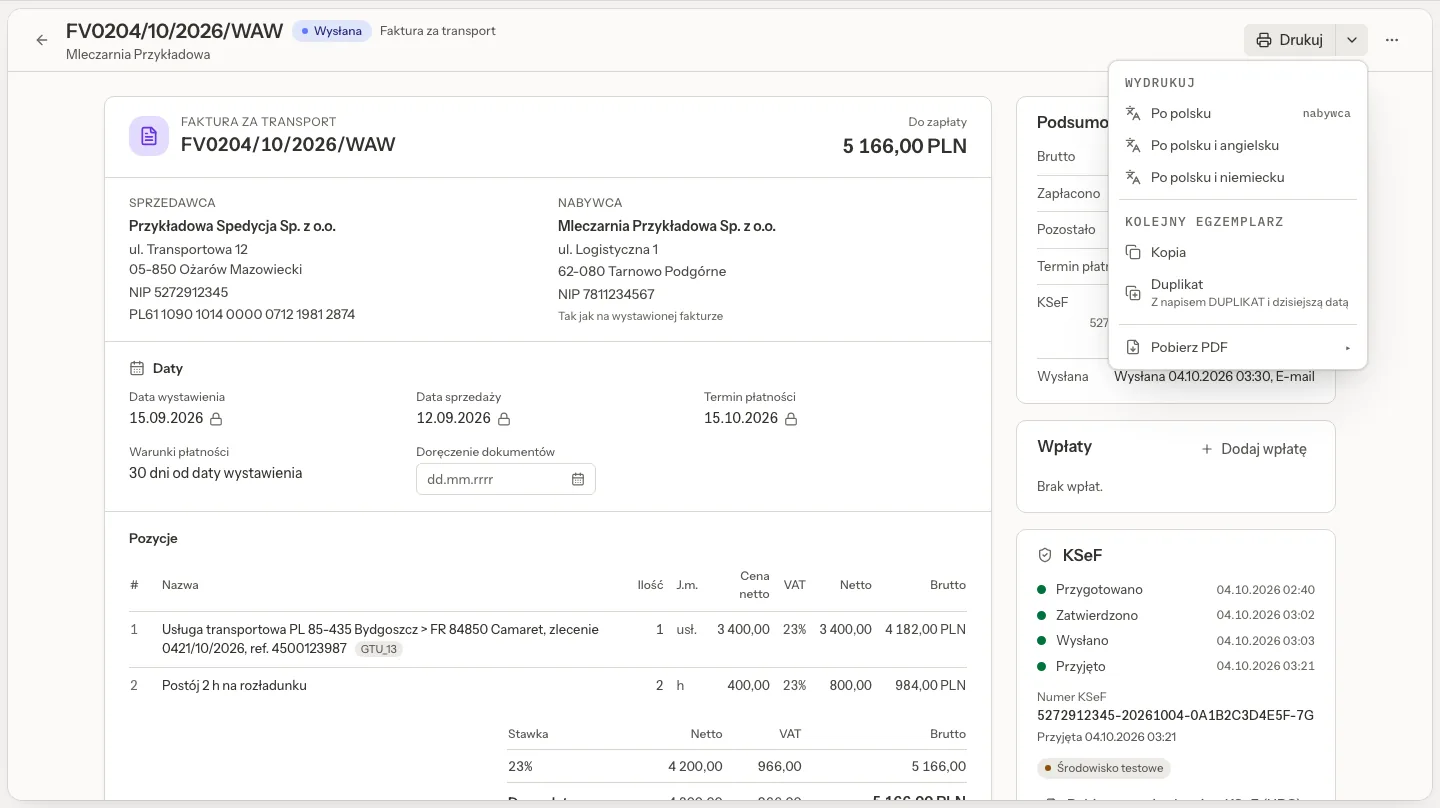
Print offers Polish, Polish and English and Polish and German. Its main button prints in the buyer's invoice language, marked buyer in the menu; for a buyer whose invoice language is English or German, English or German heads the list and is the default. Copy and Duplicate print another copy; a duplicate says DUPLIKAT and carries today's duplicate date. Download PDF makes the same invoice as a PDF. Every printout carries the amount in words, the bank account for the invoice's currency, a footer in the printout's languages and the name of the person who issued it. A draft prints as a draft, so a trial print needs no issued invoice. A print never changes any date.
TMS settings, Company and numbering, Invoice printouts (admins) holds a bank account per currency (with bank and SWIFT), the footer in Polish, English and German, and the switches for transport data and plates.
KSeF
Send to KSeF puts an issued invoice into your organization's KSeF connection, where it waits: a person prepares, checks and sends it on the KSeF screen, with every check the KSeF guide describes (sending switched on by an admin, the test environment first, a second admin on Production). Several invoices can go at once from the list. Quanty copies the KSeF outcome and number back onto the invoice by itself.
- An invoice with several lines, and a correction, cannot go through the sending table: the invoice says "Issue this invoice in KSeF by hand" and lists the fields to copy, and you note the KSeF number afterwards.
- An invoice dated another day than today asks before it goes, so a forgotten draft does not reach KSeF with an old date.
- The printout shows the KSeF code (QR) only for an invoice KSeF accepted. A number from KSeF's test or demo environment is labelled as a test environment.
Carrier costs
Carrier costs holds carrier invoices and other costs, on the tabs To check, To pay, Paid and All.
- From KSeF: with the automatic action Costs from KSeF on, purchase invoices from KSeF become carrier costs by themselves and Quanty matches them to orders. Fetch from KSeF fetches a chosen period or one company now. Suppliers you list by NIP (fuel cards, leasing, your own companies) never become costs.
- Add cost enters one by hand, optionally with its order, so Quanty compares it with the agreed rate.
- A difference to the agreed cost within the tolerance and the extras on your list pass without questions; anything else waits under To check. Approving a cost with a difference asks you to tick it and write why.
The cost card
The cost card shows the supplier, the amounts with PLN at the NBP rate, the cost type, the vehicle and cost centre (MPK), the payment term counted from the documents, its files, its KSeF invoice, its corrections and Who did what (approved, transfer prepared, payment accepted, paid, handed to accounting).
- One invoice for several orders: a collective carrier invoice is matched line by line. Assign the orders, or confirm what AI proposes, and each order's Settlement tab shows its own part.
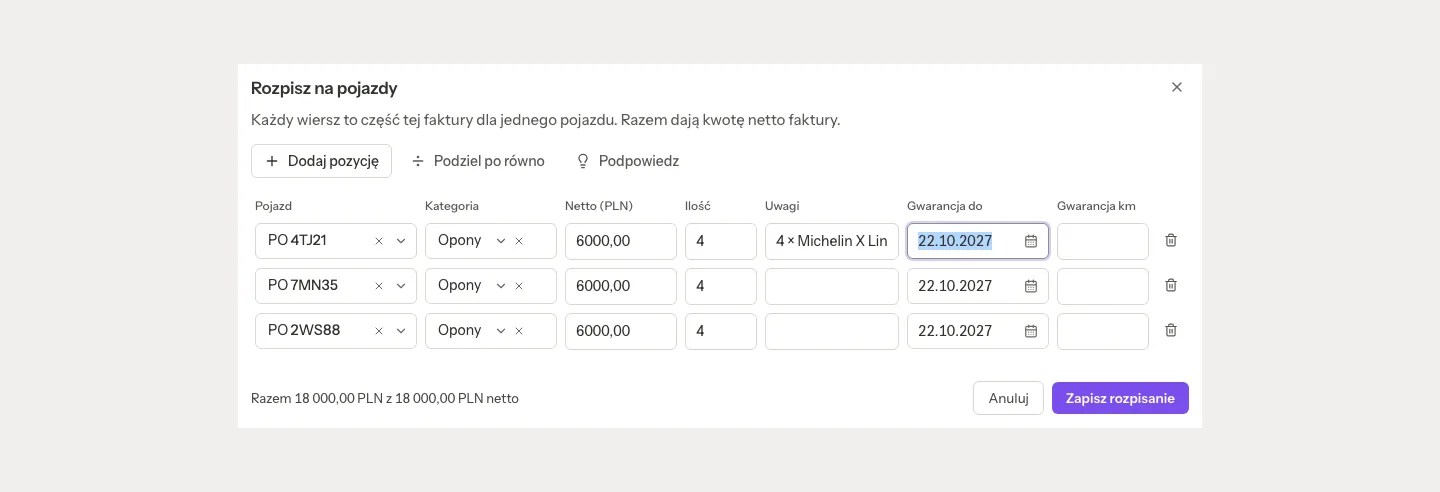
- Split to vehicles: for a fleet invoice, such as twelve tyres for three trucks. Split evenly spreads the net to the cent, Suggest reads plates and words from the KSeF lines, and Ask the AI helps when the AI switch is on. A sum that does not add up is refused with the numbers. Once the invoice is approved, each line is a cost of its vehicle, and a line can carry a warranty (until a date or for a number of km). Remove the split in the card's menu puts the invoice back as it was. A carrier invoice of an order is never split to vehicles.
- Receive into stock books the parts on the invoice into the parts store, and Pay from the cash desk pays it in cash. See TMS fleet and workshop.
Mark as handed to accounting in the accountant's export stamps every exported cost. After that the cost cannot be edited or re-rated; only an admin can bring it back, with a reason, and the next export takes it again.
Bank and payments
Bank and payments has the tabs Receivables, Bank, Transfers and Cash desk.
- Receivables: open and overdue invoices, by invoice, by client or as payments in.
- Bank: Import a bank statement (MT940, camt.053 or CSV from your bank, up to 5 MB; transfers imported before are skipped). Quanty suggests which invoices and costs each transfer pays. Transfers are To match, Matched or Skipped.
- Transfers: payment batches for approved costs, paid to each carrier's default account, with the VAT white-list check. Above an amount you set, a second person, other than the one who prepared the batch, accepts the payment (Accept the payment).
Reminders and interest
- Payment reminder on an invoice, and the automatic action Payment reminders, write a polite reminder to the client by e-mail or WhatsApp, to the contact person's address first. The automatic action prepares each reminder for a person to read and send, unless it is set to Automatic. An archived contact never gets one.
- When a client promises to pay on a given day, reminders wait until that day; a promise that is not kept is marked as broken.
- Interest note counts the statutory interest for late payment in commercial transactions and the recovery compensation for an invoice. Check the figures before you print the note, and confirm the rates with your accountant.
Cash desk
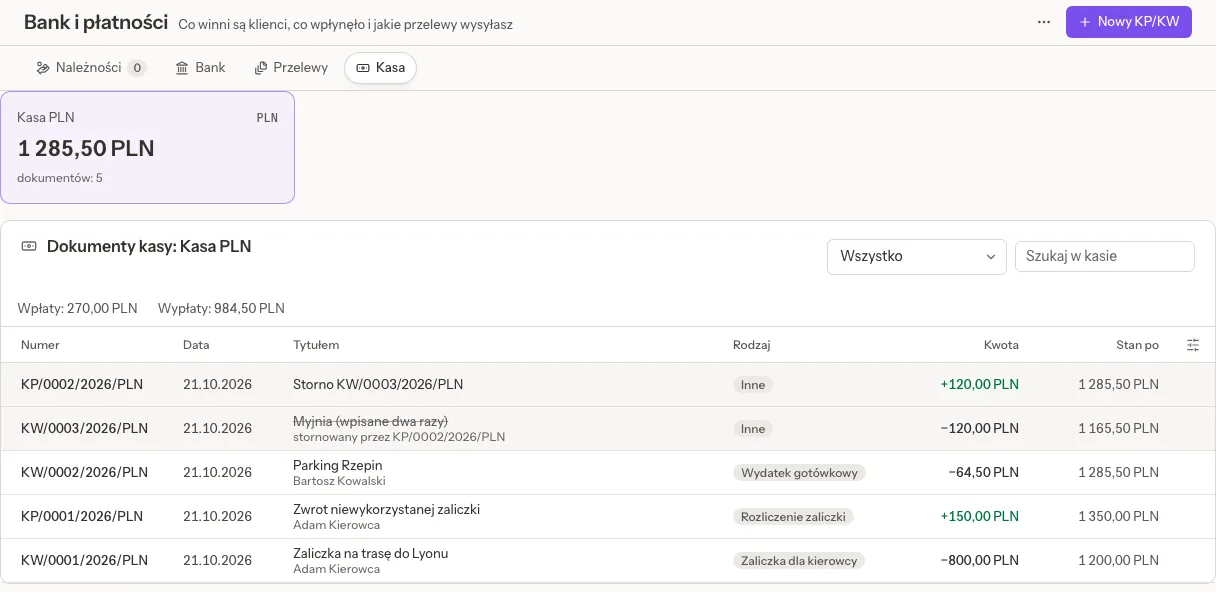
Cash desk keeps cash desks, one currency each, with KP (money in) and KW (money out) slips: advances for drivers and their settlement, cash expenses, invoices paid in cash, refunds and bank deposits or withdrawals.
- New KP/KW writes a slip. A slip is never edited or deleted: a mistake is reversed with a storno and a reason, and both stay on the list.
- The balance never goes below zero, also for a backdated slip or two payouts at the same moment.
- Pay from the cash desk on a cost pays its invoice in cash; a storno makes it unpaid again.
- Each slip prints with the amount in words. A receipt photo can be read by the AI, when the AI switch is on.
- The driver's card shows his slips under Cash desk.
Related pages
- KSeF e-invoices: the connection, sending and the four-eyes rule.
- TMS orders and quotes: the Settlement tab and the margin.
- TMS clients and carriers: payment terms, credit limits and bank accounts.
- TMS in chat: what the assistant does with costs and invoices, and what stays a person's step.