

TMS people, trips and working time
Fleet, People holds "Drivers and office staff: documents, absences and equipment" in one register. Only people marked as drivers ("This person is a driver") go into sets, orders and the planner; office and workshop staff are there so you can hand them equipment and count their absences.
The page's views are List, Calendar, Summary, Settlements and Posting. Filter by Drivers, Others or All, and search by name, code, phone or job. The list's Card column shows when each driver card was last downloaded. Add person adds one; a person can be linked to the driver your telematics reports.
The person card
The tabs are Overview, Trips and diets, Absences, Equipment, Documents, Working time, Orders and History (office staff have no Working time tab). The card also shows the person's current set, the materials taken from the parts store and the person's cash desk slips.
Documents
Scans of the driving licence, the code 95 qualification, the driver card, medical and psychological checks, ADR, health and safety training, the A1 certificate, contracts and more. Drop a scan and Read the dates fills its dates (with the AI switch on; you check them before saving). A document's expiry moves the person's deadline, and the deadlines show nearest first and in Issues before they end. Scans are kept in Files for 5 years.
Medical checks and identity documents are private: only admins and the person who added them can open them, and every opening is written in the history. Others see only the dates.
Absences
Each absence has a code from TMS settings, Absences: what it counts as (annual leave, leave on demand, sick leave, childcare and so on), and whether its days are working days or calendar days. Leave counts working days on the Polish holiday calendar, sick leave calendar days, and hours are working days times the daily norm.
- The card counts an absence before you save it, and a saved one can be corrected with a reason.
- The leave balance for the year shows on the card.
- Calendar colours the month by code, and Summary is the month's person by code table, in days or hours, with its Excel.
- Company days off (for example for a holiday that falls on a Saturday) are set in the same settings pane.
Trips, diets and the monthly settlement
Trips are built from sets, border crossings and order stops. Build trips (on the person card) or Build trips from the data (in Settlements) makes them for a month; a rebuild never drops a trip that holds a person's edits or money.
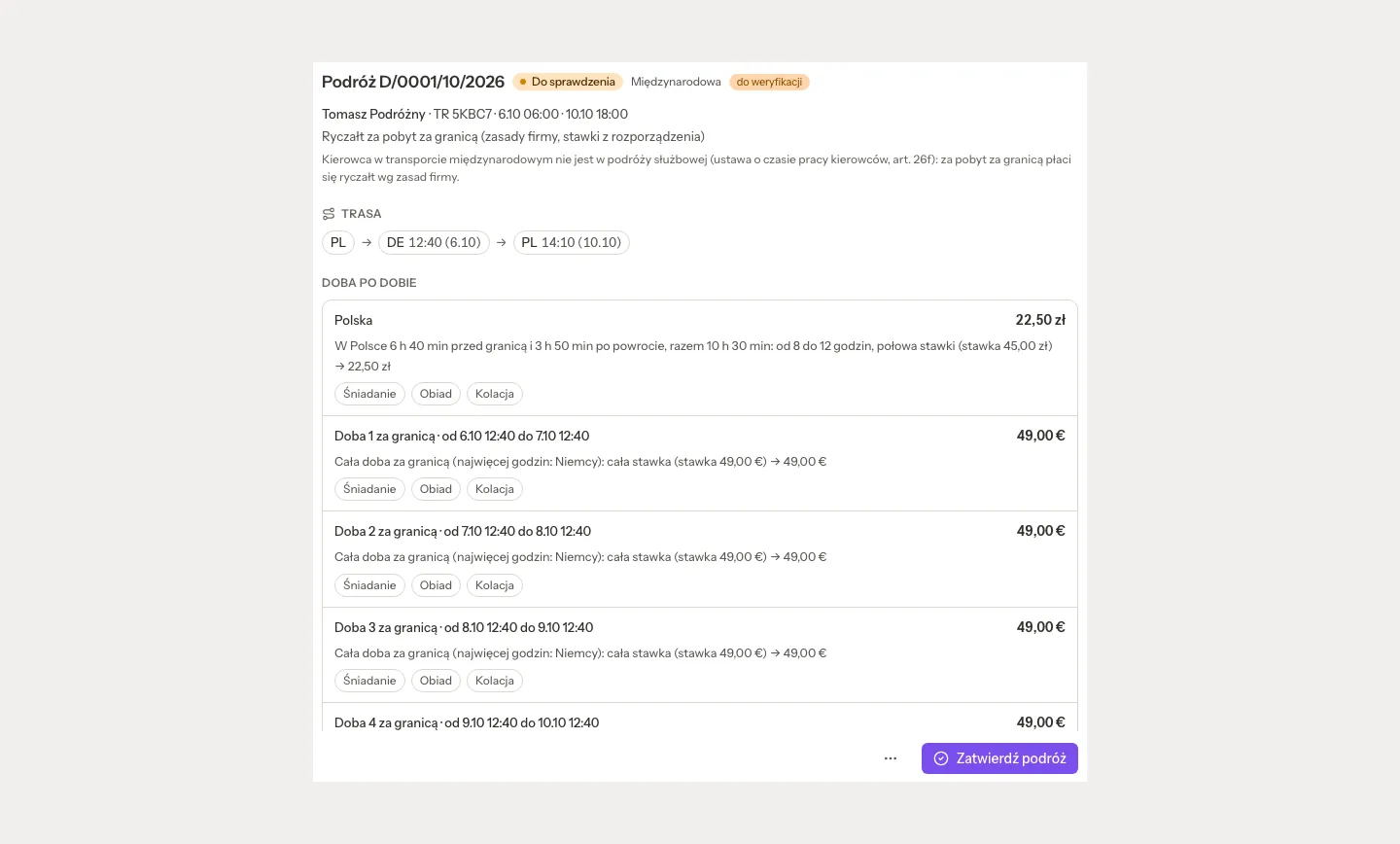
The trip window shows:
- the route, for example PL → DE 12:40 → PL;
- Day by day: every day with its country, its amount and why, in plain words;
- toggles for the meals the driver was given, and the night picker, which offers only the driver's own hotel bills;
- advances, receipts and the history.
A trip that overlaps another trip, or a night whose receipt is still undecided, cannot be approved "anyway". Approve trip freezes its PLN value; Undo the approval (with a reason) opens it again.
The Trips and diets tab on the person card holds the month's trips, Advances and Receipts (a photo or PDF, read by the AI when the switch is on, or typed in). Send the settlement asks first, naming the person, the month and the channel (e-mail or WhatsApp).
People, Settlements shows one row per driver for the month: trips, days abroad as fractions (for example 4 1/3), diets and allowance per currency, lodging, receipts, advances and the balance, To pay or To return in PLN, and what was already paid. Foreign currencies are converted at the NBP rate of the working day before the payout; until that table is out, the rate is marked provisional.
- Approve ready approves every trip that is ready.
- The ⋯ menu holds Download Excel, Build trips from the data and Mark as paid, after which the month's approved trips, advances and receipts cannot be changed.
- A line names earlier months that still have money to pay out or settle, and opens them.
"This is the input for payroll, not the payroll." Cash advances for a trip can be paid out on a KW slip at the cash desk.
Rates and rules are yours to confirm
TMS settings, Diets and trips lists every rate and rule the settlement uses: the domestic diet, the allowance abroad (in international transport a company rule), meal reductions, the lodging flat for a night in the cab and the allowance during posting (both off by default), and the payout day. Each preset value reads to verify until someone in your company confirms it, and a rule you change reads as your company's own. Confirm the values with your payroll or your adviser: Quanty is not legal or payroll advice.
Posting declarations
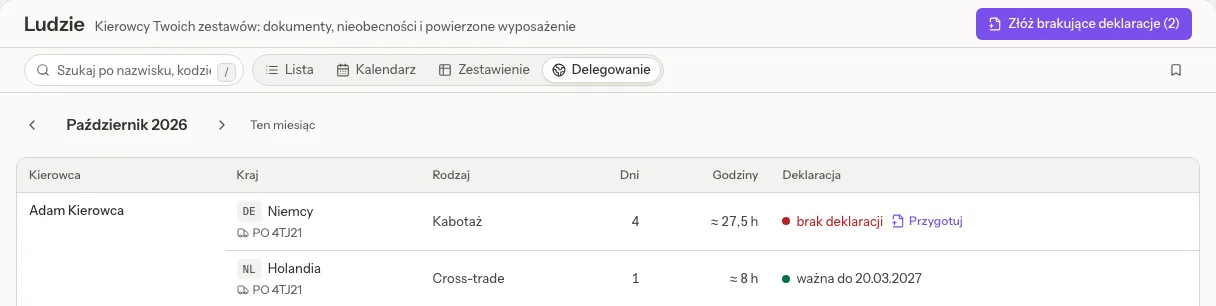
People, Posting shows, month by month, each driver's cabotage and cross-trade by country, with the days and the approximate hours (an estimate from the orders and telematics), and a dot for the declaration: valid until a date, expiring, no declaration, prepared but not filed, filed late, the truck is not on it, does not cover every day, or outside the EU posting rules.
- File the missing declarations (N) prepares drafts. To file in the portal lists them; a posting that has already started is marked: the declaration will be late, so file it as soon as you can.
- Open a declaration to see Data for the portal, each value with Copy, and Open the IMI portal.
- File it at postingdeclaration.eu, then type back the Declaration number, the Filed on day and the dates as filed. The filing day decides whether the declaration was in time.
- Add the PDF from the portal keeps it, private, in Files. Renew and Withdrawn in the portal are in its menu.
"Quanty does not file declarations by itself": you file each one in the portal. The IMI declarations card in TMS settings, Connections holds the community licence number and the contact person printed on every declaration.
Cabotage, return to base and tachograph files
- Vehicle card, Mobility package: cabotage in a country, for example "Cabotage in Germany: 2/3 until 25.10", the break that follows, Return to base in N days with the operating centre (Change the base, Mark the return to base), and when the tachograph was last downloaded, with Upload the vehicle unit file and the 90-day deadline.
- Driver card: when the driver is due home, with Mark the return home. Quanty counts the standard weeks and says plainly that it does not spot the shorter limit after two reduced weekly rests.
- Working time tab: Upload DDD files (several at once; a file already there is skipped), when the driver card was downloaded and the next download within 28 days, and, from telematics, Now (driving left today and this week, the next break and rests) and The last 28 days. Times from telematics are an estimate, not the tachograph record. DDD files are stored with their deadlines; Quanty does not read their contents.
Issues are raised for a missing or late declaration, a posting that cannot be checked, the cabotage limit, and a due return to base, return home or tachograph download.
Estimates, not rulings
Posting, cabotage and return-to-base figures are estimates from your orders, absences and telematics. They help you see what to check; whether a declaration is needed and what pay is due stays your company's decision.
Related pages
- TMS fleet and workshop: sets, equipment and handover protocols.
- TMS overview: the settings panes, including Absences and Diets and trips.
- Telematics (GPS): where positions and driving times come from.